


Golf Master 3D
4.426.93K Reviews
App Specs
- Version
- 1.55.0
- Updated On
- License
- Free
- Downloads
- 10,000,000+
- Developer
- Doodle Mobile Ltd.
- Categories
- Sports
- Platform
- Android
Screenshots





 Analysis by AppCompare
I tend to judge a free sports game by what it lets me enjoy before asking for money, and by whether its paid options feel like extras or a shortcut. Golf Master 3D is free to download, so you can try its golf matches without paying upfront. That makes it an easy game to sample during a spare moment, though “free” does not mean every item is free: in-app purchases range from $0.99 to $99.99 per item. I’d treat optional spending as a separate decision rather than part of the entry price.
What the free entry gets you
The useful question is not simply whether the game costs nothing to install, but whether the basic experience suits you before you spend. I’d start by learning the swipe shot and playing enough to see whether its pace and competitive feel are enjoyable. If those core moments work for you, there is a reason to keep playing; if they do not, buying items is unlikely to fix the mismatch.
Because purchases are priced across a wide range, I would avoid tapping through checkout casually. Before buying anything, check the exact item and price shown in the purchase flow, and decide whether it addresses a specific frustration or is merely tempting in the moment. A short session can make upgrades seem essential when they may simply make progression feel smoother. Keeping a firm personal limit is a sensible way to enjoy a free-to-start game without letting small decisions accumulate.
Where the game earns its place
Its main appeal is the compact golf loop: read a shot, swipe with care, and adjust to conditions such as wind. That gives a quick match more thought than a simple reflex game, while still being easier to pick up than learning the details of a full golf simulation. I find that middle ground valuable. You can enjoy aiming and shot control without needing a long session or prior knowledge of golf rules.
The game is also built around competition, including real-time multiplayer and tournaments. That can give a familiar course attempt a clear purpose: you are not only trying to land a good shot, but trying to perform under comparison. The trade-off is that a competitive format may be less relaxing than solo play. If I want quiet practice, a head-to-head match is not necessarily the right choice; if I want a quick test of composure, it is a better fit.
How it plays and who gets value from it
I look at the way a golf game handles its first few rounds before deciding whether it can become a regular break-time choice. Here, I’d focus on how the swipe controls feel and whether the competitive format suits the mood I’m in, rather than assuming that a free download must be good value for everyone. That distinction matters most when choosing between a quick, focused match and a slower, more simulation-oriented golf game.
First Impressions
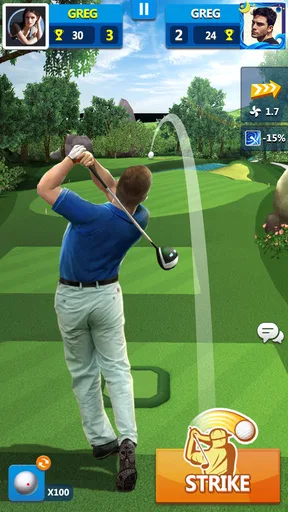
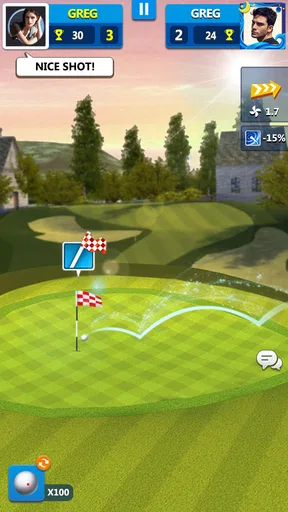
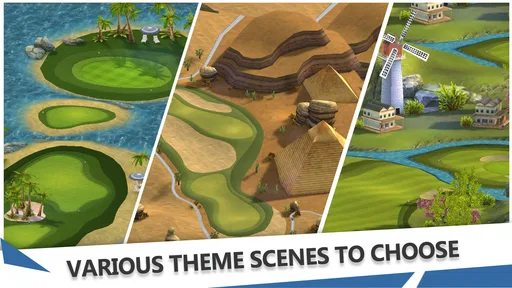
Upon launching Golf Master 3D, I was immediately drawn in by the vibrant graphics. The developers have done a fantastic job of making everything look crisp and realistic. The courses are beautifully designed, with lush greens, challenging bunkers, and stunning water features. It's easy to forget you're playing a mobile game.
Worth Reading Before You Choose

Flipboard Shows What News Apps Must Do Beyond the Feed

Switching to Android Auto Means Rethinking Your Driving Routine

Google Calendar Makes a Crowded Week Easier to Manage

Ludo King Makes the Most of the Minutes Between Plans

Baby Panda World Brings Quick Play to Modern Phones, but Its Game Library Feels Busy

ESPN’s Live Game View Makes Following Close Games Easier
Navigation through the app is quite intuitive. The main menu is straightforward, allowing you to quickly jump into a game or explore other features like tournaments and practice modes. There's also a handy tutorial for beginners, which I think is a nice touch.
Gameplay Experience
Let's talk about the gameplay, which, to be honest, is where Golf Master 3D truly shines. The controls are simple: you swipe to swing, and the speed and direction of your swipe determine the power and spin of your shot. It might sound easy, but mastering it takes a bit of practice.
I found the physics to be quite accurate, which adds a layer of realism that many golf games lack. The wind factor is also incorporated, so you have to plan your shots carefully. The multiplayer feature allows you to compete against other players in real-time, which adds a competitive edge and keeps things exciting.
Small choices that improve a round
A practical way to learn the swipe control is to change only one part of your shot at a time. First aim for a consistent direction, then experiment with power, and only after that focus on adding spin. When several inputs change together, a missed landing tells you very little about what went wrong. This step-by-step approach makes practice more useful, especially for someone new to mobile golf.
Wind is another reason not to treat every shot as a straight power test. I would pause briefly before swiping, check how the conditions affect the intended line, and choose a safer landing area when a direct attempt looks risky. A shot that avoids a bunker or water can be more valuable than an ambitious one that leaves the next stroke awkward. That kind of decision-making is where the game’s golf theme feels more engaging than a basic tap-to-hit arcade game.
On a small touchscreen, a swipe can feel inconsistent if I rush or use an awkward grip. I get more dependable input when I keep the phone steady and make a deliberate gesture rather than trying to correct the shot mid-swipe. If your results vary, it may be worth slowing down before blaming the physics. The control style rewards repeatable motion, but that same reliance on gesture precision can frustrate anyone expecting a single button to handle the shot.
Features Galore
One of the things that stood out to me was the variety of features available in the app. From single-player challenges and tournaments to real-time multiplayer duels, there's something for every type of player. I particularly enjoyed the tournaments, where you can compete for a spot on the leaderboard and earn rewards.
The customization options are a nice bonus. You can upgrade your clubs and balls, which can impact your game significantly. There are also plenty of avatars and outfits to choose from, allowing you to personalize your golfing experience.
Progression without overspending
Upgrades can make rounds feel different, but I would separate equipment decisions from cosmetic choices. Club and ball improvements are the purchases or progression choices I would consider in terms of how they affect play; avatars and outfits are primarily about personal style. If you are unsure whether an upgrade is worth pursuing, play a few rounds with your current setup and identify the obstacle you actually want to solve. That keeps customization from becoming a string of impulse choices.
Tournaments and leaderboards can also make rewards feel like a reason to keep returning. I’d enjoy that loop most when I treat rewards as a bonus, not as a promise that every session must produce a better result. Competitive games can make a loss feel like wasted time, but a tournament is also a chance to practise shot choices under pressure. That outlook helps keep the game enjoyable even when the leaderboard is not going my way.
Community and Social Interaction
Golf Master 3D does a great job of fostering a sense of community. You can join clubs, chat with other players, and even team up for certain challenges. This social aspect adds another layer of engagement, making the game more than just about hitting the ball into the hole.
The app regularly hosts events and special challenges, which keeps the content fresh and the community active. It's a great way to test your skills against others and earn some exclusive rewards.
Choosing the right kind of golf game
Compared with a traditional golf simulator, this is a more approachable mobile option: the swipe control and short competitive rounds put immediate play ahead of a deep, slow simulation. That is an advantage if you want to make a few decisions and get back to your day. It is a compromise if you want detailed course management or a close substitute for playing a real round. I would choose a more simulation-focused game for that, and this one when I want golf-flavoured competition in a more convenient format.
It also differs from a purely casual arcade sports game. Wind, shot direction, power, and spin give you reasons to think before each swing, while multiplayer and tournaments make performance matter beyond a single shot. If you prefer an entirely solitary experience, the social and competitive parts may not add much for you. If you enjoy measuring your play against other people, they give the basic swing a stronger sense of purpose.
A realistic way to fit it into the day
I can see this working well during a lunch break or while waiting for an appointment: open the game, play a short round or challenge, then stop without needing to plan an evening around it. A tournament or live duel is a better choice when I have enough uninterrupted time to focus, because rushing a swipe while distracted can turn a close match into a frustrating one. For a relaxed five-minute break, I would lean toward solo play or practice instead of entering a competitive session.
That distinction is useful for parents and younger players, too. The game is rated for Everyone, but its competitive elements and optional purchases are still worth understanding before handing over a device. I would explain that purchases cost real money and check the device’s purchase controls if a child will play. The age rating makes the content broadly accessible; it does not make spending decisions irrelevant.
Trade-offs worth knowing before you settle in
The strongest reason to keep playing is also a potential source of friction: improvement depends on repeating a gesture accurately while accounting for conditions. If you enjoy refining technique, that gives rounds a satisfying learning curve. If you want every shot to behave predictably without practice, the same system can feel unforgiving. I would give the tutorial a fair try and judge the controls after a few deliberate attempts rather than after one hurried round.
Competition can be energizing, but it can also make a casual game feel demanding. Live opponents and leaderboard goals are not ideal when you want to pause frequently or play with no pressure. In that mood, solo challenges are the better fit. Likewise, players who dislike optional purchase prompts or progression tied to upgrades may prefer a game with a simpler, fixed-cost model. The free download lowers the barrier to trying it, but it does not guarantee that every player will like the ongoing structure.
The app is made by Doodle Mobile Ltd., and its broad audience is reflected in its Everyone age rating. It has a 4.4 average from around 164,000 ratings, with roughly 27,000 written reviews and over 10 million installs. Those figures suggest that many people have tried it, but I would still base my choice on the kind of golf experience I want rather than popularity alone.
Final Thoughts
All in all, Golf Master 3D is a fantastic mobile golf game that offers a comprehensive and engaging experience. Whether you're a seasoned golfer or a casual player, there's plenty here to keep you entertained. The graphics, gameplay, and community features make it a standout in the genre.
If you're looking for a mobile game that combines the strategic elements of golf with the convenience of playing anytime, anywhere, this app is definitely worth a download. So grab your virtual clubs and tees, and see if you can become the next Golf Master!
On the practical side, it costs nothing to get started, and the current version is 1.54.0 for devices running Android 5.0 or later. The first download is therefore a low-commitment way to decide whether the swipe-based play suits you. I would not recommend spending simply because an early round feels difficult; learn the controls first, then decide whether any optional item is genuinely useful to your style of play.
My short verdict is that this is a good choice for someone who wants accessible golf with a competitive edge, a bit of practice, and optional social play. I would skip it if I were looking for a deep simulation, a wholly pressure-free game, or a purchase with a single fixed price and no optional spending. If that trade-off sounds fair, try the free version, take time with the tutorial, and see whether the shot control keeps you coming back.
Ready to hit the greens? You can find Golf Master 3D on both Android and iOS platforms. Give it a try and let me know how you fare on the course!
Pros
- Realistic graphics enhance gameplay experience.
- Wide variety of courses keeps it engaging.
- Easy-to-learn controls for all ages.
- Multiplayer mode adds competitive fun.
- Regular updates with new features.
Cons
- In-app purchases can be expensive.
- Requires a stable internet connection.
- Ads can be intrusive at times.
- Battery drain on older devices.
- Limited offline gameplay options.
FAQs for Golf Master 3D
What is Golf Master 3D and how does it work?
Golf Master 3D is a realistic golf simulation game available on Android and iOS. The game offers stunning 3D graphics and real-world physics to provide an immersive golfing experience. Players can compete in tournaments, challenge friends, and improve their skills through practice modes. It’s designed for both casual players and serious golf enthusiasts.
Do I need an internet connection to play Golf Master 3D?
Yes, an internet connection is required to play Golf Master 3D. The game features online multiplayer modes where you can compete against players worldwide. Additionally, regular updates, new courses, and events are accessible only with an internet connection, ensuring you have the latest content and features.
Is Golf Master 3D free to play, and are there in-app purchases?
Golf Master 3D is free to download and play, but it offers in-app purchases. These purchases can enhance gameplay by providing additional clubs, balls, and customization options. While you can enjoy the game without spending money, these extras can help accelerate progress and improve your experience.
What are the device requirements for Golf Master 3D?
Golf Master 3D requires a device running Android 5.0 or later, or iOS 10.0 or later. It is optimized for both smartphones and tablets, but a device with a powerful processor and a good amount of RAM will provide the best performance and graphics quality. Ensure you have sufficient storage space for the installation.
How can I improve my skills in Golf Master 3D?
To improve your skills in Golf Master 3D, take advantage of the practice mode to refine your swing and learn the intricacies of each course. Participate in tournaments to gain experience and match up against skilled players. Additionally, experimenting with different clubs and balls can help you find the best combination for your play style.


